
P1 VoltBridge
P1 VoltBridge: the meter reader for your digital meter
A small device that clicks into the P1 port of your digital meter and sends what your home is importing and exporting right now straight to ModuleTwo over your home network. That is how the battery knows when to charge or discharge. An existing P1 device connects to the built-in pass-through port.
The current stand-alone price and delivery time are shown in the shop (in Dutch).
What is a P1 port?
On a compatible digital meter, the P1 port is a small socket (like a phone-line plug, RJ12) on the front or underside of the meter, often behind a flap or marked "P1". Through that port the meter shares its readings: how much your home is importing and exporting at this moment.
The VoltBridge passes on meter data. The power for your household appliances does not run through this device; ModuleTwo exchanges power through its own mains connection.
The readings travel over your local home network straight to ModuleTwo. For the overview in the MyGrid Energy app, aggregated readings are sent to our secure cloud in the EU.
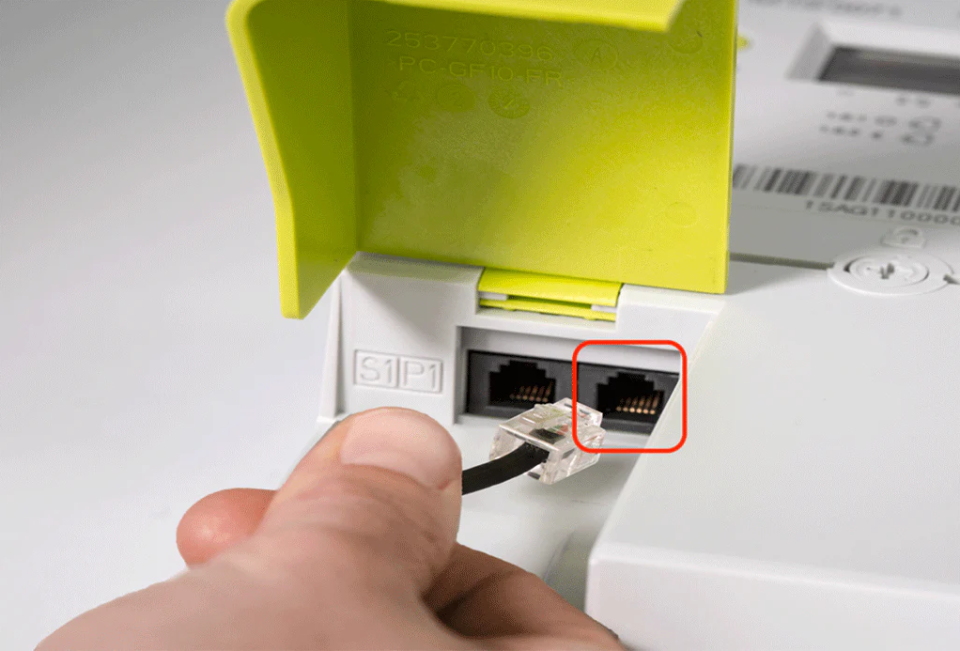
P1
What it does for you
Live import and export
See in the MyGrid Energy app what your home is taking from or putting on the grid right now.
Smart charging and discharging
ModuleTwo charges with your solar surplus and supplies power when your home needs more, based on these readings.
No changes to your installation
Click in, pair, done. Your meter stays the grid operator's and is not modified.
Built-in splitter
Already have a P1 device? Connect it to VoltBridge's pass-through port so both devices can use the same P1 port.
External power over USB-C
If the meter's P1 port does not provide enough power, you can power VoltBridge through its USB-C connection using an external power supply.
Home Assistant
P1 VoltBridge shares meter readings with Home Assistant via local MQTT. ModuleTwo control is enabled separately in the MyGrid Energy app.
Home Assistant
Connect P1 VoltBridge to Home Assistant
View grid import, export and meter readings in the Home Assistant Energy dashboard via local MQTT. MQTT Discovery adds the available sensors automatically. You need Home Assistant with its MQTT integration and a local MQTT broker.
P1 VoltBridge provides meter readings only and does not control the battery. To manage ModuleTwo charging and discharging with Home Assistant, enable Home Assistant control separately in the MyGrid Energy app.
Available phase, gas and demand readings depend on your smart or digital meter. MQTT data updates approximately once a minute.
Step-by-step MQTT setup on GitHub.
What if my meter has no P1 port?
MyGrid also supports compatible energy meters from other brands, such as Shelly. They measure your electricity import and export so MyGrid EMS can control ModuleTwo using current readings.
Tell us which meter you have. We’ll help you choose a suitable metering option.
Ask about your meterBefore you startEnable your P1 port
The battery needs your meter readings to know when to charge or discharge. Those readings come from the P1 port: a small connection behind a flap on your meter. Whether you need to have it enabled first depends on where you live.
Netherlands
On almost all Dutch smart meters the P1 port is open by default. You plug in the cable and you are done. On meters from before 2014 the port may be present but inactive; you will notice because the connected device shows no sign of life. Your grid operator — Liander, Enexis or Stedin — will then enable it remotely and free of charge.
Flanders (Fluvius)
Here the port is closed by default. Enabling it is free, remote and arranged online. Keep a recent electricity bill and your ID card or itsme at hand: the details of your request must match your energy contract. Allow up to 72 hours. If your meter was just installed, wait a few days. You can tell the port is open by the triangle above "GP" or "P1" on the screen.
Wallonia (ORES and RESA)
Here too the customer port is closed by default. With ORES enabling is free and can be requested when the meter is installed or at any time afterwards. With RESA enabling is free at installation; afterwards you arrange it via your MyRESA account.
Brussels (Sibelga)
The port is open by default. You do not need to do anything.
Not sure about your meter? Send us the model at hello@mygrid.energy and we will check with you.
Quick start
How to pair the P1 VoltBridge
Keep your phone nearby with Bluetooth on. The whole pairing happens in the MyGrid Energy app.
1. Install the MyGrid Energy app
Download the app, open it and create an account (or sign in).
2. Choose Add device › P1 VoltBridge
The app guides you through the next steps.
3. Click the VoltBridge into the P1 port
Insert it into the P1 port of your digital meter. The port must be available and in Belgium sometimes has to be activated first through your grid operator.
4. Hold the button for 5 seconds
This puts the VoltBridge in pairing mode. Switch on Bluetooth on your phone.
5. Select the device and choose your Wi-Fi
The app finds the VoltBridge; connect it to your home Wi-Fi network.
6. Check your live import and export
Do you see values moving in the app? Then the pairing worked.
Not working straight away? Check that the P1 port is active, that the VoltBridge is firmly seated and that your Wi-Fi reaches the meter cupboard.
Download the VoltBridge manual
 MyGrid DataLock™
Your energy, your data, your control.
Battery, software and cloud in one secure system.

Secured from the chip
Your battery only starts with software approved by MyGrid.
Secure connection
Protected communication between your battery and the MyGrid platform.
Your data stays in the EU
Your energy data stays in a European cloud environment managed by MyGrid.
How does MyGrid DataLock work?
ModuleTwo is hardware-locked at the factory and linked to MyGrid’s secure environment. MyGrid manages the firmware, security keys and cloud. You keep an overview in the MyGrid Energy app.
Questions about the P1 VoltBridge
Do I need the P1 VoltBridge if I buy a ModuleTwo?
Yes — without your meter's readings ModuleTwo cannot charge and discharge smartly. Whether the VoltBridge comes with your set depends on the current promotion: during many offers it's in the box, sometimes you order it separately. Check the current offer in the shop. Ordering it separately also makes sense as a replacement or if you want a second one.
Does my home's power flow through the VoltBridge?
No. The VoltBridge passes your meter's readings on over your local home network. The power for your household appliances does not run through this device; ModuleTwo exchanges power through its own mains connection.
What if my P1 port is already in use?
P1 VoltBridge has a built-in splitter. Connect your existing P1 device to VoltBridge's pass-through port to use both devices on the same P1 port.
Does the VoltBridge need extra power?
If the meter's P1 port does not provide enough power, you can power VoltBridge through its USB-C connection using an external power supply.
Where does my meter data go?
VoltBridge sends the readings directly to ModuleTwo over your local network. Aggregated readings are sent to our secure EU cloud so you can see your energy data in the MyGrid Energy app.
Does P1 VoltBridge work with Home Assistant via MQTT?
Yes. P1 VoltBridge shares grid import, export and meter readings via local MQTT. MQTT Discovery adds the available sensors to Home Assistant automatically. VoltBridge provides meter readings only; for ModuleTwo control, select Home Assistant control separately in the MyGrid Energy app. Available phase, gas and demand readings depend on your meter, and MQTT data updates approximately once a minute. Read MyGrid’s official Home Assistant guide.
Ready to see your consumption?
During many promotions the VoltBridge already comes with a ModuleTwo. If the current offer doesn't include it, or if you only need the meter reader, order it separately in the shop.